If you’re still taking bookings through Instagram DMs, WhatsApp messages, or phone calls, you already know how exhausting it is. The back-and-forth, the missed messages, the double bookings — it adds up fast.
ClientaHub’s online booking page solves all of that in one go. Here’s exactly how it works, what your clients experience, and why it makes running your beauty business so much simpler.
What Is the ClientaHub Booking Page?
Your ClientaHub booking page is a clean, branded link you can share anywhere — your Instagram bio, your website, a WhatsApp message, or even a printed card. When a client clicks it, they can book an appointment with you in under a minute, without sending you a single message.
No app download required. No account needed. It works on any device, any time of day.
How Clients Book — Step by Step
The booking flow is designed to be as simple as possible. Here’s exactly what your clients see:
Step 1 — Choose a service Your client sees all your active services, grouped by category. Whether you offer hair cuts, lash extensions, massage therapy, or nail treatments — everything is listed clearly with pricing and duration so there are no surprises.
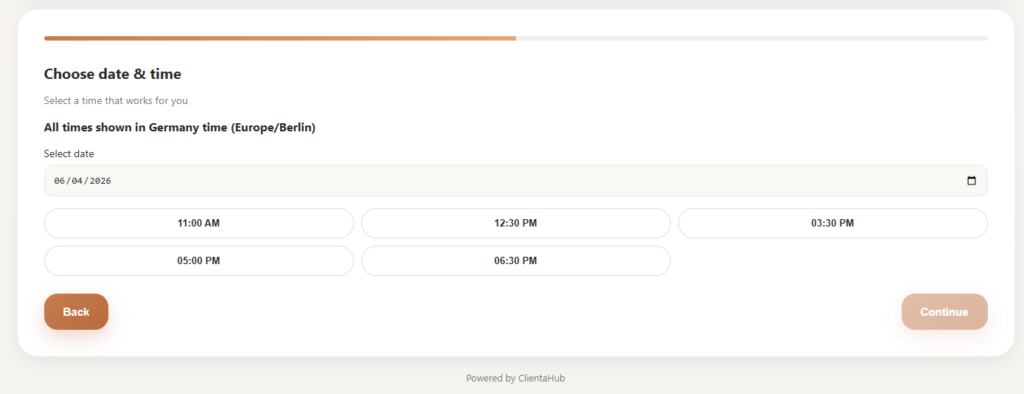
Step 2 — Pick a date and time This is where the magic happens. ClientaHub only shows your genuinely available slots — based on your real opening hours and the length of the service being booked. If a slot is already taken, it simply doesn’t appear. No double bookings. No awkward “sorry that time is actually gone” messages.
Step 3 — Enter their details The client fills in their name, phone number, and email address. Simple and quick — no lengthy forms to put people off.
Step 4 — Confirmed The appointment is created instantly. If you have intake forms enabled, the client is shown a link to complete their form straight away. No chasing, no follow-up messages needed from you.
What Your Clients See on Your Booking Page
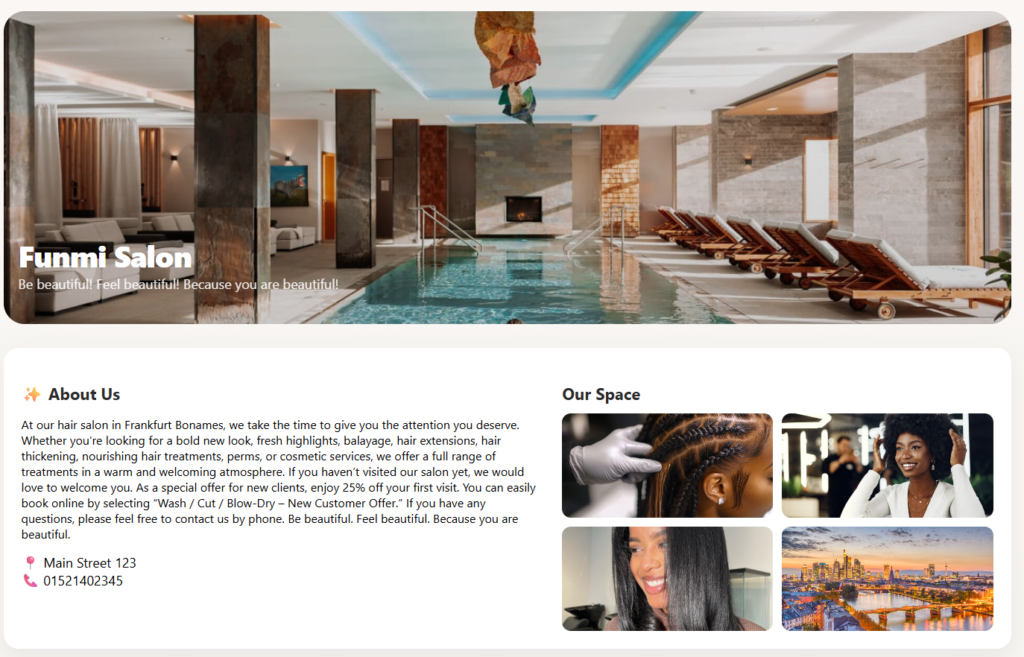
Your booking page isn’t just functional — it’s branded to your business. Clients see:
- Your cover image, logo, and business name
- Your tagline and about us text
- Your phone number, address, and gallery images
- All your active services, neatly grouped by category
First impressions matter, and a professional booking page tells new clients that you run a serious, organised business before they’ve even met you.
How Availability Works Behind the Scenes
One of the most important features of the booking page is the availability logic. ClientaHub automatically:
- Calculates available time slots based on your opening hours
- Sets the slot length to match the duration of each service
- Blocks out any times that are already booked
- Shows clients only what is genuinely available in real time
This means you never have to manually manage your calendar or worry about a client accidentally booking a time that’s already taken. It all happens automatically.
What Happens After a Client Books
Once a booking is confirmed, everything updates instantly across your ClientaHub account:
- The appointment appears in your Dashboard and Bookings list straight away
- The client is automatically saved to your Clients list — no manual data entry needed
- If intake forms are enabled, the client sees a link to complete their form right after booking
- When you mark the appointment as Completed, the client automatically receives a feedback request
You don’t have to do anything manually. The system handles the follow-up for you.
Why This Changes Everything for Your Business
Think about what the booking page actually replaces:
- No more replying to DMs at 10pm on a Sunday
- No more back-and-forth trying to find a time that works
- No more manually adding client details to a spreadsheet
- No more forgetting to ask for a review after an appointment
Your booking link works 24 hours a day, 7 days a week. While you’re sleeping, doing a treatment, or enjoying a day off — clients can still book with you. Every slot gets filled automatically. Every new client gets saved. Every completed appointment triggers a review request.
That’s not just convenient. That’s a completely different way of running your business.
How to Share Your Booking Link
Once your booking page is set up, share it everywhere:
- Instagram bio — “Book online 👇 [your link]”
- Facebook page — pin it as a post or add it to your bio
- WhatsApp — send it to clients instead of going back and forth
- Google Business Profile — add it as your booking link
- Your website — embed it or link to it from your homepage
- Email signature — include it in every email you send
The more places your link appears, the more bookings come in automatically.
Ready to Set Up Your Booking Page?
If you haven’t set up your ClientaHub booking page yet, it takes less than 5 minutes. Add your services, set your availability, upload your logo — and your page is ready to share.
Set up your booking page now →
Already a ClientaHub user? Log in and head to your booking page settings to make sure everything is looking its best.
ClientaHub helps salons, barbers, spas, and beauty professionals manage bookings, reduce no-shows, and build stronger client relationships — all in one simple platform. Try it free for 30 days, no credit card required.